
Free Online GPS Speedometer
Check how fast you are moving with Xpeedometer, a free online speedometer that uses your device's GPS to estimate speed in real time. It works in a web browser, so there is no app to install. Enable location access, start the meter, and choose km/h, mph, or m/s.
GPS readings depend on your device, signal, and surroundings. Use this tool as a general reference, not as a replacement for a vehicle's certified speedometer or for safety-critical decisions.
How to use the online speedometer
Follow these steps to view your current GPS-based speed:
- Allow location access in your browser and make sure device location services are enabled.
- Press Start on the speedometer above.
- Choose a unit: kilometres per hour (km/h), miles per hour (mph), or metres per second (m/s).
- Move with your device and read the displayed GPS speed. A clear view of the sky can help improve the signal.
If no reading appears, check the browser's location permission, confirm location services are on, and reload the page.
How to Enable Blocked Location Access
If you accidentally blocked the site for accessing the location, then the tool will not work. To re-enable location access, follow these steps:
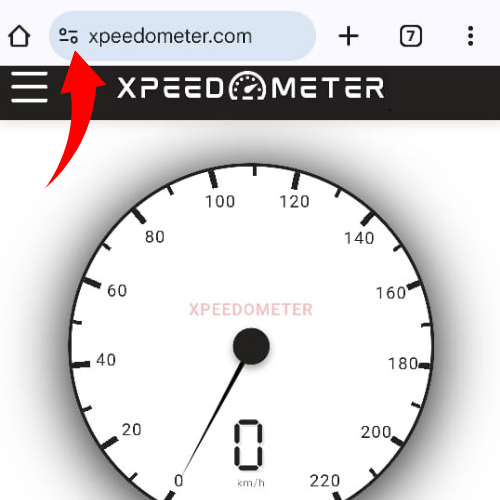
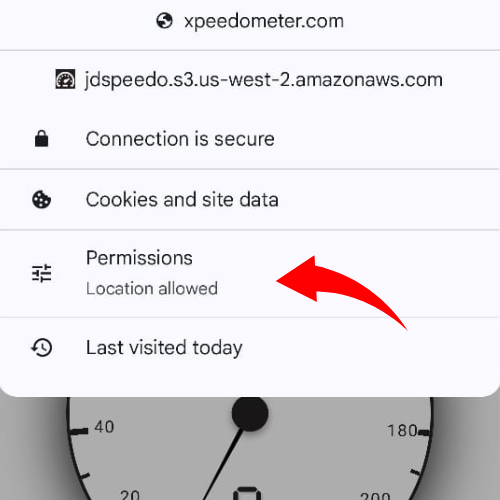
- Open site permissions: Select the site information or lock icon beside the address bar.
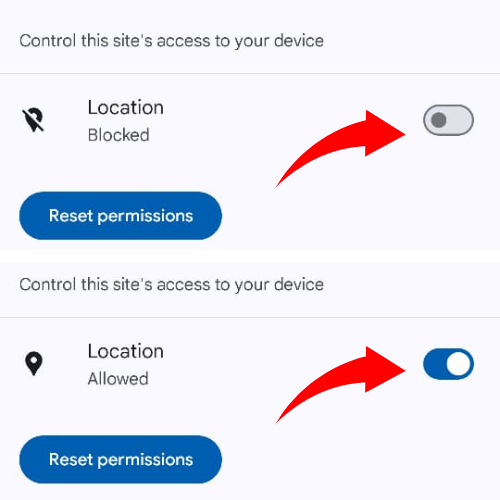
- Allow location access: Change the location permission to Allow for Xpeedometer.
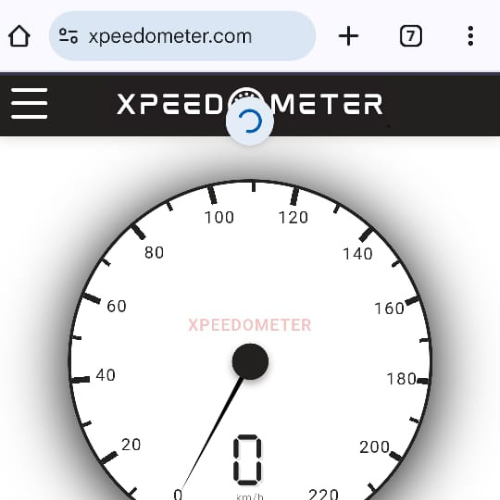
- Reload the page: Refresh Xpeedometer and press Start to try again.
Browser menus vary by device. You can also manage location permission in your browser or device settings.
How to allow location access on a phone
Turn on your phone's location services, then allow location access for Xpeedometer in your browser. The exact menu names vary between browsers and operating systems.
Step 1: Open Xpeedometer and select the site information icon beside the address.
Step 2: Open the site's permissions or location settings.
Step 3: Set location access to Allow for this site.
Step 4: Reload the page and press Start to view a GPS speed estimate.
How does a GPS speedometer estimate speed?
Xpeedometer uses the location information made available by your device and browser to estimate movement speed. The update rate and reading quality depend on your device and GPS reception. Tunnels, buildings, and poor signal can make the reading fluctuate or prevent a result.
This is an estimate for general awareness, not a certified measuring instrument or official vehicle, railway, or timetable data. For vehicle speed, follow the vehicle's own speedometer and local safety rules.
Which speed units can I choose?
- Kilometres per hour (km/h) for metric speed readings.
- Miles per hour (mph) for imperial speed readings.
- Metres per second (m/s) for SI speed readings.
Select a unit using the controls beside the speedometer. Changing units changes the displayed value, not the GPS measurement.
Use GPS speed readings responsibly
Use the tool while walking, cycling, or travelling as a passenger. Drivers and riders should not handle or look at a phone while moving; check the screen only when it is safe and legal to do so. GPS readings can lag or vary, so never rely on this page for navigation, braking, or other safety-critical decisions.
FAQs
Xpeedometer.com is a free browser-based speedometer that estimates your current speed using your device's GPS. It works on compatible phones, tablets, and computers.
The speedometer uses GPS location data from your device to estimate your current speed and displays it in the selected unit.
No. Xpeedometer.com runs in your web browser, so you do not need to install an app.
No. The speedometer needs an internet connection and location access to work.
It works on smartphones, tablets, and desktop computers with a compatible browser and location services.
Yes. You can choose miles per hour (mph), kilometres per hour (km/h), or metres per second (m/s).
Yes. Xpeedometer.com is free to use.
Xpeedometer.com does not store or share your location data. Location information is used by your browser to provide the speed reading.